API error. "Bad Request"

This is what i’m trying to run:
curl -X GET \
https://app.teable.ai/api/table/tblNQb33EopwbUoQRPK/record?fieldKeyType=name&filter={“conjunction”%3A"and"%2C"filterSet"%3A[{“fieldId”%3A"fld76FFqgBVygtxZf4b"%2C"operator"%3A"is"%2C"value"%3A"Lạng+sơn"}]}&cellFormat=json” \
-H “Authorization: Bearer _YOUR_API_TOKEN_” \
-H “Accept: application/json”

BUT I GOT THIS ERROR: ( My request has special Vietnamese characters, it was running smoothly before until 2 days ago. I also notice the Advanced API builder does not provide “fieldKeyType” as “name”, now it gives me “fieldId” instead.)

Bad Request:

{“message”:“Invalid ListTableRecordsQuery input”,“status”:400,“code”:“validation_error”,“data”:{“domainCode”:“validation.invalid”,“domainTags”:[“validation”],“details”:{“issues”:[{“expected”:“string”,“code”:“invalid_type”,“path”:[“sort”,0,“fieldId”],“message”:“Invalid input: expected string, received undefined”}]}}}

Hi @vincentlo,

I found the cause from your screenshot.

The issue is not caused by the Vietnamese characters. The filter value “Lạng Sơn” is valid.

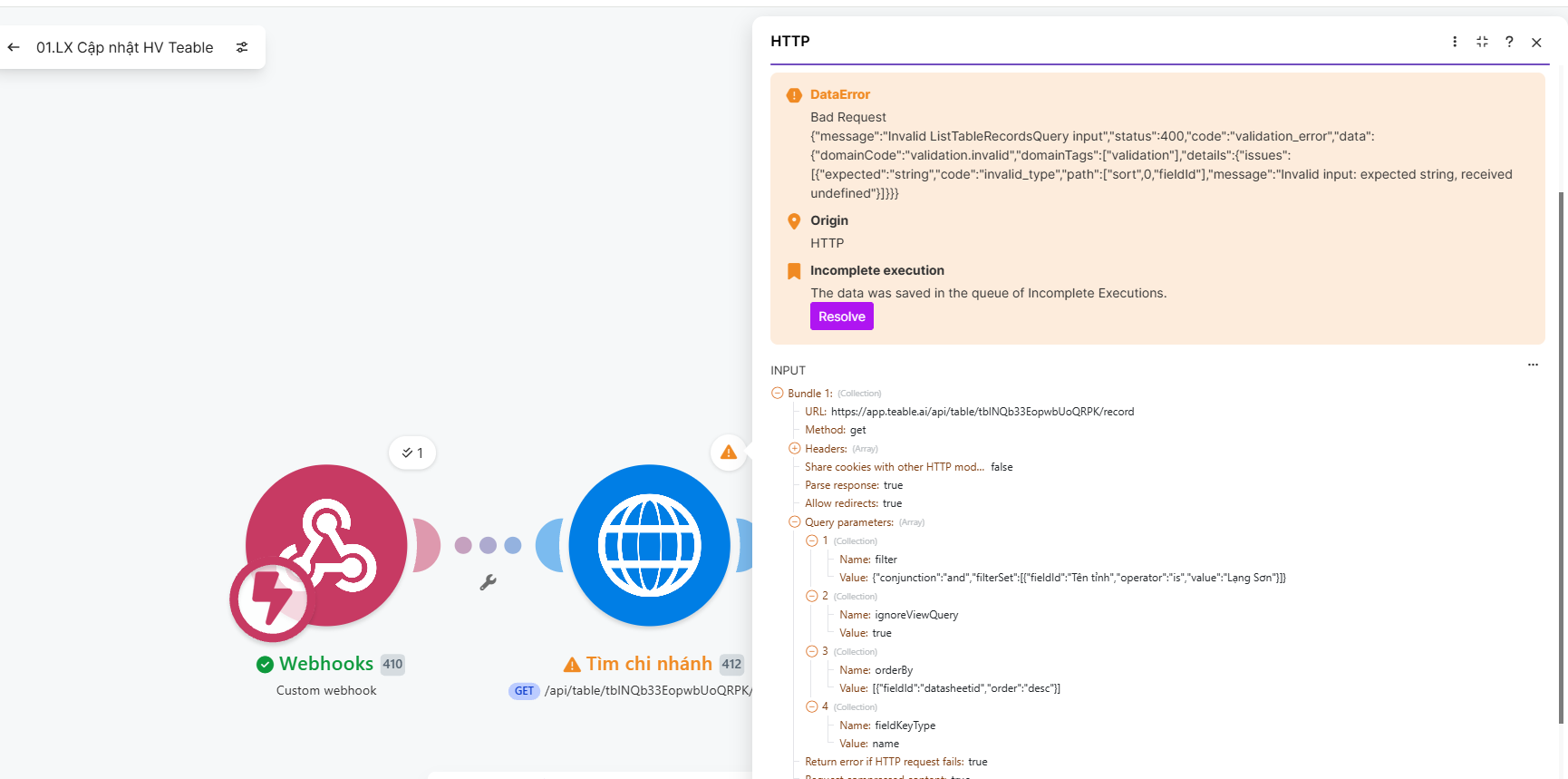
In the actual HTTP request, there is an extra orderBy parameter:

orderBy=[{“fieldId”:“datasheetid”,“order”:“desc”}]

The fieldId “datasheetid” cannot be resolved to a field in this table, so the backend receives an invalid sort field and returns:

sort[0].fieldId: expected string, received undefined

Please remove the orderBy parameter first and retry. If you need sorting, use a valid field ID from the same table, for example:

orderBy=[{“fieldId”:“fldXXXX”,“order”:“desc”}]

Using field IDs is recommended because they are stable even if field names change. You can still keep fieldKeyType=name if you want the response fields to use field names.
Why was it running so smoothly before?
Are there any new changes to the system?

There was no recent change to the sort API behavior.

The problem has been resolved. Thank you.

1 Like