I have BYOK API setup in my space but the system says I am out of credits?
Perhaps make more clear - Recommended Teable house models & BYOK model options in the chat window. Allow us to turn on Recommended models once we have BYOK options setup.
Hi,
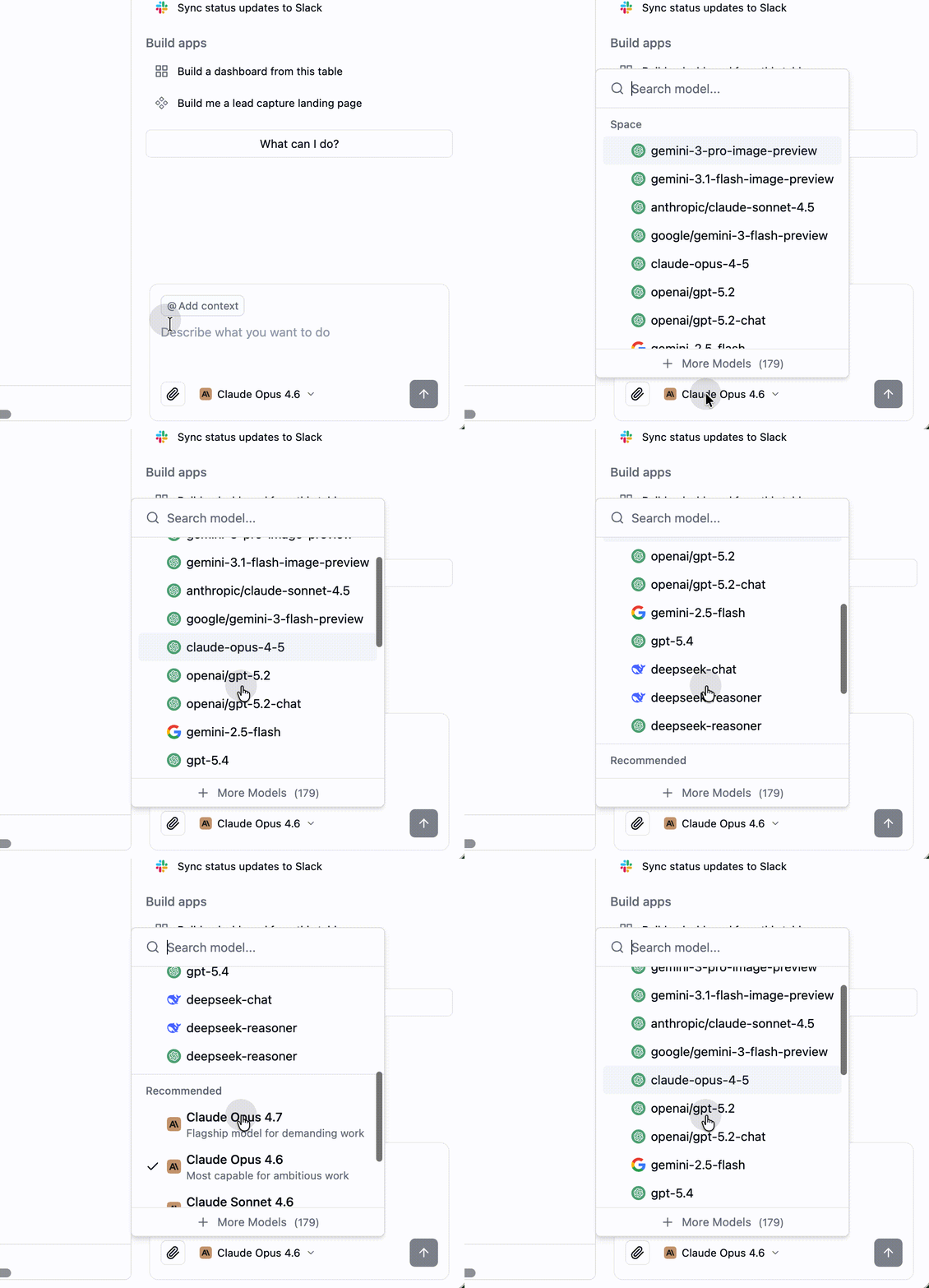
If BYOK is already set up, please switch the model in the chat window. Your space models will appear first in the model list.
Thank you - I did see the Space models and switch - though none of the space models are currently working ? Here is a video of our situation. Thank you for helping…
Hi @jpoland00 ,
I watched the video you shared — very helpful. Both the BYOK error and the recurring AI task failure appear to be related to your BYOK configuration.
Could you please share your BYOK settings? For example:
- BaseURL
As for the AI task failure, please check if the field in that table is an AI field. If it is, it’s likely connected to the BYOK configuration issue.
Share those details and we’ll take it from there.
Thank you very much for LEO for you rapid assistance! I am huge Teable fan and Airtable refugee! Awesome Screenshot & Awesome Screenshot
Just following up — have you had a chance to check whether the field in that table is an AI field? We’ll look into the details tomorrow during work hours.
Yes - the field is an AI Field. The 2 screenshots above show my BaseURL’s for Gemini and Claude. Presently the AI feature is not working at all for me: Cuppy
API Error: 500 Cannot read properties of undefined (reading ‘toLowerCase’). This is a server-side issue, usually temporary — try again in a moment. If it persists, check status.claude.com.
Completed
3m 23s
Test
Cuppy
There’s an issue with the selected model (gemini-2.5-flash-lite). It may not exist or you may not have access to it. Run --model to pick a different model.
Completed
2s
Hi @jpoland00 ,
I tested the Anthropic BYOK on my end — it’s working fine. Could you try again?
As for the gemini-2.5-flash-lite error — this is expected behavior. Starting April 9, 2026, Teable’s agent engine was upgraded, and these AI features now only support Anthropic-compatible API endpoints. Using other providers like Gemini may result in errors.
For details, see: https://help.teable.ai/en/basic/ai/custom-model
Thank you Leo. The issue remains for me.
In this video the AI chat runs 3+ minute w/ no output and this error: **
Cuppy**
API Error: 500 Cannot read properties of undefined (reading ‘toLowerCase’). This is a server-side issue, usually temporary — try again in a moment. If it persists, check status.claude.com.
Completed
3m 15s
Field

Add an AI field to analyze each customer
Cuppy
API Error: 500 Cannot read properties of undefined (reading ‘toLowerCase’). This is a server-side issue, usually temporary — try again in a moment. If it persists, check status.claude.com.
Completed
3m 15s
Test
Cuppy
There’s an issue with the selected model (gemini-2.5-flash). It may not exist or you may not have access to it. Run --model to pick a different model.
Completed
3s
test
Cuppy
There’s an issue with the selected model (gemini-2.5-pro). It may not exist or you may not have access to it. Run --model to pick a different model.
Can you help me get the BYOK AI Chat working - Space credits?
Hi @jpoland00 ,
The 500 error is being passed through directly from your configured API endpoint — it’s not a Teable issue.
To confirm whether the problem is with your API configuration or Teable: could you try calling your API directly (using the same BaseURL and API key) in a different environment — for example, via curl, Postman, or any API client — and let us know if it succeeds?
If the direct call also fails, the issue is with your upstream API service. If it succeeds, we’ll investigate further on our end.
The Teable test shows the connection is working? Awesome Screenshot
Issue: Teable AI Chat returning 500 errors despite a valid Anthropic API key.
Test Results: Ran a live curl test directly against api.anthropic.com using the same base URL and key configured in Teable’s AI settings. Claude responded cleanly — 12 tokens in, 6 out, stop reason end_turn. The API key is valid and the Anthropic endpoint is fully reachable.
Root Cause: Two things are colliding. First, Teable has a Space Credits system that gates all AI features — when credits hit zero, it blocks requests even when BYOK is configured. The BYOK key is supposed to route traffic directly to Anthropic (on your dime, not Teable’s), but Teable isn’t honoring that bypass correctly. Second, there’s a bug in Teable’s response-handling code: when it receives Claude’s reply, it tries to call .toLowerCase() on a field that comes back as undefined, throwing a 500 before the response ever reaches you. The API is working. Teable is the problem.
Recommendation: In your Space Settings → AI, look for a toggle to set the Anthropic provider as the default for this space — this is separate from the admin-level provider config and is what actually enables BYOK to bypass Space Credits. If that toggle is already on and the 500 errors persist, this is a Teable code bug worth filing at their GitHub. The toLowerCase crash is reproducible and specific enough that it should get traction quickly.
LEO - it looks to be solved now! I removed all models except Sonnet 4.6.
Perhaps this area could be gently improved for the user.
What’s missing: There’s no default model selected. Teable needs to know which Claude model to use for AI Chat. If no model is designated as the default, it may be pulling undefined when it tries to initialize the chat session — which would directly cause the .toLowerCase() crash (it’s trying to process the model name and getting nothing).
What to look for: Next to or below each model there should be a way to set one as the default or primary model. It might be a star icon, a radio button, or a “Set as default” option. If you don’t see it on this page, look for a separate “Chat Model” or “Default Model” dropdown somewhere in this same settings panel when you scroll.
Immediate fix to try:
-
Remove claude-sonnet-4-5, claude-opus-4-5, and claude-opus-4-6 — keep only claude-sonnet-4-6 (the most current, best supported)
-
With only one model in the list, Teable may automatically treat it as the default, which should resolve the undefined model name issue
-
Then test AI Chat again
I was having the same issue and came here looking for answers. I believe I figured it out. You have to select the version that is listed under Space. It appears the picker defaults to the Recommended version. Seems to be working for me now.
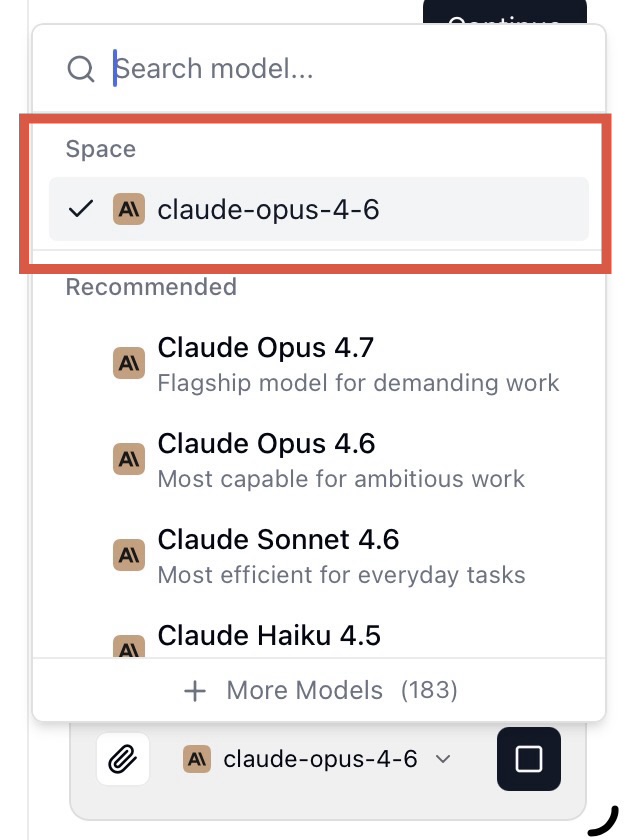
It should remember your Space model selection and stick with it. We’ve identified a bug where it may fall back to the recommended model unexpectedly, and the team is on it.
Hi @jpoland00 ,
A quick clarification: if your Space model is selected, BYOK can run even when Space Credits are exhausted.
The model picker should remember your Space model selection and keep using it. We’ve identified a bug where it may unexpectedly fall back to the Recommended model, and the team is already working on it.
We’ll also investigate the toLowerCase error separately.